🔷 Introduction
The DevOps ecosystem has matured to a point where automation alone is not enough.
Pipelines are larger, systems are more distributed, logs are massive, and engineers spend too much time on repetitive tasks:
- Debugging CI pipeline failures
- Searching logs
- Writing boilerplate YAML
- Investigating flaky tests
- Diagnosing Kubernetes issues
- Ensuring compliance
This is where AI + DevOps becomes a game-changer.
AI-powered DevOps (AIOps) brings intelligence to automation:
It analyzes logs, predicts failures, generates code templates, assists in deployments, and accelerates incident resolution.
This guide explains the real implementation architecture of AI-driven DevOps systems — exactly how large companies are doing it today.
🔷 1. Why DevOps Needs AI Today
❌ Problem 1: Huge Volume of Logs
Kubernetes, CI pipelines, microservices → produce millions of logs.
❌ Problem 2: Manual Debugging
Engineers manually search logs, making MTTR high.
❌ Problem 3: Repetitive Work
YAML, Helm values, Terraform modules, pipeline code.
❌ Problem 4: Lack of Predictive Insights
Traditional dashboards show past events, not future risks.
❌ Problem 5: Multi-tenant Platforms = More Complexity
Different teams = different failures, patterns, configurations.
AI solves all of this by learning from patterns and giving actionable intelligence.
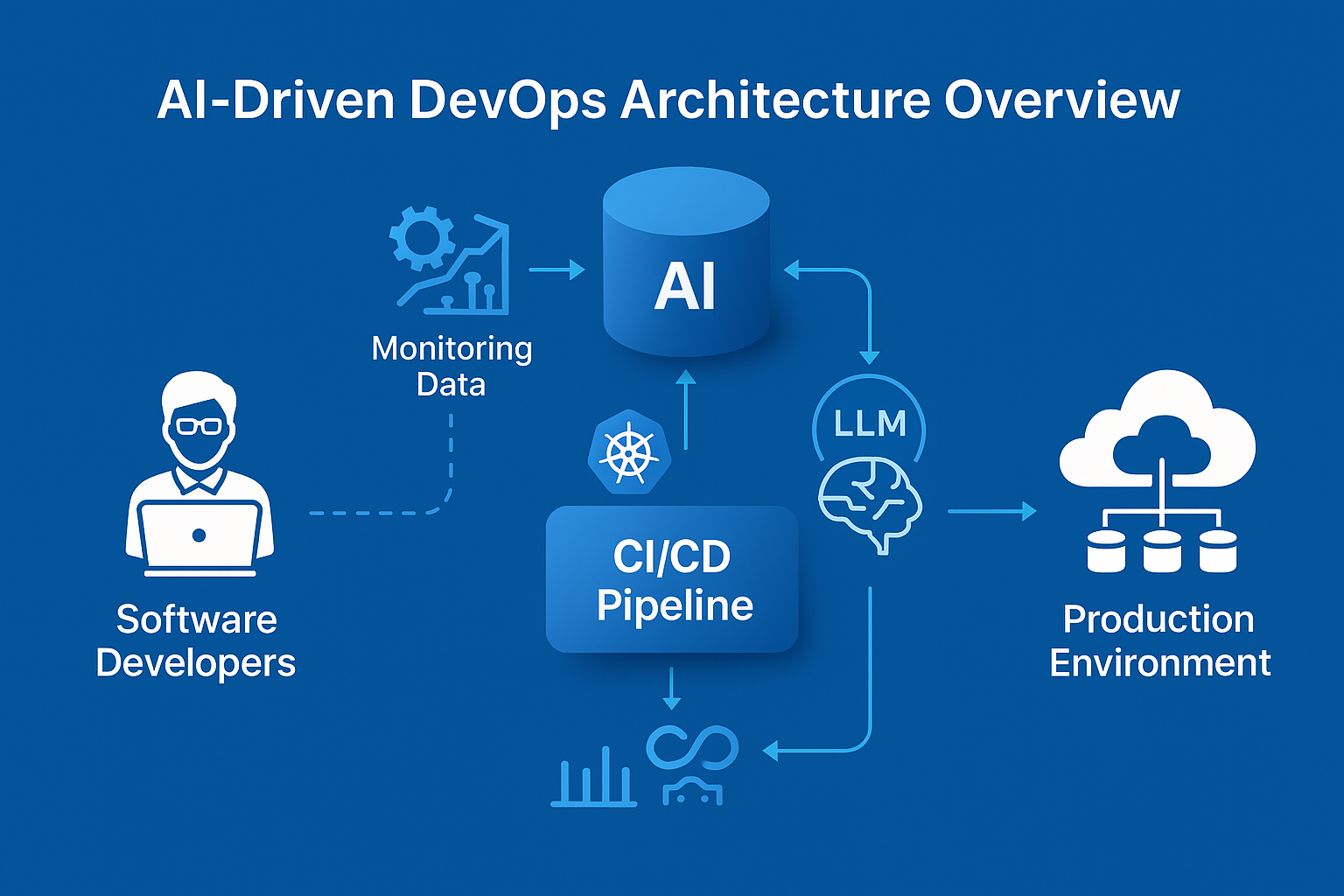
🔷 2. AI-Driven DevOps Architecture Overview
Here is a modern AIOps architecture:
AI sits after telemetry aggregation but before alerting and resolution.
🔷 3. Step-by-Step Implementation Guide
⭐ STEP 1 — Centralize All Telemetry
To train AI models, data must flow through a single pipeline.
Sources:
- Kubernetes logs
- CI/CD logs (GitLab, Jenkins)
- Simulation logs (SDV/VDK)
- API gateway logs
- Airflow task logs
Use:
- Fluent Bit
- Filebeat
- Vector
- OpenTelemetry Collectors
Move everything into:
- Azure Data Lake
- ADX (Azure Data Explorer)
- Blob Storage
- S3 (if AWS)
This acts as the training dataset & inference source.
⭐ STEP 2 — Build AI-Focused Log Normalization
AI works best with structured logs.
Normalize logs using:
- JSON format
- Key/value pairs
- Consistent field names
- Log enrichment (pod name, namespace, user ID)
Example normalized log:
AI uses this to find patterns.
⭐ STEP 3 — Integrate LLM (Azure OpenAI Recommended)
Your AIOps brain sits here.
Use:
- GPT-4
- GPT-4o
- GPT-4 Turbo
- Mistral 8x7B
- Llama 3 70B
Deploy via:
- Azure OpenAI (best for enterprise + data compliance)
- Self-hosted LLM with vLLM
- LangChain orchestrator
Capabilities:
- Summarize failure logs
- Extract root cause
- Recommend fix
- Generate CI/CD YAML
- Explain Kubernetes events
⭐ STEP 4 — Build AI-Driven CI/CD Features
1. AI Log Summaries
Instead of reading thousands of lines → AI summarizes:
Example:
“Pipeline failed due to missing environment variable SECRET_KEY. Last successful run stored it in Group Variables; new MR changed group path.”
This reduces MTTR by 80%.
2. AI-Generated Pipelines
Input:
AI → Outputs full GitLab CI pipeline:
- Build stage
- Test stage
- Scan stage
- Deploy stage
- Artifact upload
3. AI Auto-Fix Suggestions
AI detects:
- Permission issues
- K8s policy violations
- GitOps drift
- Misconfigured Helm
- YAML indentation mistakes
⭐ STEP 5 — Integrate AI Into Kubernetes Operations
AI helps with:
🚀 Deployment failures
AI analyzes events:
AI gives direct fix.
🚀 Resource Optimization
AI reviews:
- Pod usage
- Node pool usage
- HPA patterns
And suggests:
🚀 Predictive Autoscaling
AI detects:
- Usage patterns
- Simulator spikes
- Batch job peaks
And recommends scaling ahead of time.
⭐ STEP 6 — AI for SDV / Digital Twin Cloud Workflows
AI improves:
- Long-running simulations
- Airflow DAG debugging
- Test result summarization
- Fault injection analysis
- Telemetry classification
Example AI output:
This would take hours to identify manually.
⭐ STEP 7 — Add ChatOps for Real-Time Assistance
Integrate AI with:
- Slack
- Teams
- Discord
- Custom portal
Engineers can ask:
AI responds instantly.
⭐ STEP 8 — Build Auto-Remediation Scripts
AI triggers actions:
- Restart pods
- Re-run Airflow tasks
- Apply patches
- Roll back deployments
- Clear stuck PVC mounts
This forms a self-healing platform.
🔷 4. Real-World AI-Driven Workflow Example
Scenario: Kubernetes Deployment Failure
- Deployment fails in production
- Otel Collector → logs to ADX
- LLM reads logs
- LLM produces root-cause summary
- AIOps engine suggests fix
- ChatOps notifies developer
- Auto-remediation patch applied
- Deployment succeeds
- Incident documented automatically
Result:
What normally took 1–2 hours → solved in <30 seconds.
🔷 5. Best Practices
Data
✔ Ensure logs are structured
✔ Use redaction for sensitive fields
✔ Store all traces for AI training
✔ Index logs by tenant/team
AI Model
✔ Use embeddings for log pattern matching
✔ Use retrieval-augmented generation (RAG)
✔ Fine-tune with your platform’s logs
✔ Use Azure OpenAI for security
Operations
✔ Add guardrails for auto-fixes
✔ Version AI prompts
✔ Include audit logs of AI decisions
🔷 Conclusion
AI-driven DevOps is not “future tech” — it is today’s necessity for cloud-native platforms.
With AI:
- Logs become insights
- Pipelines become self-healing
- Deployments become predictable
- Onboarding becomes faster
- Kubernetes becomes simpler
- Engineering velocity increases dramatically
Platforms that adopt AI will outperform traditional engineering by 5–10× in productivity, reliability, and speed.