Introduction
As enterprises consolidate infrastructure, multi-tenant Kubernetes enables multiple teams to share clusters safely. However, naive Kubernetes setups fail to prevent cross-team interference, security breaches, or noisy-neighbor effects.
1. Why Multi-Tenancy Matters
- Reduces operational cost
- Enables efficient resource sharing
- Centralizes governance
- Standardizes DevOps practices
- Supports multiple customers/teams in one platform
Multi-Tenant Kubernetes: A Complete Implementation Guide for Enterprise-Grade Isolation
Multi-tenant Kubernetes is one of the most demanded architectures in modern enterprise platforms — especially in cloud-native product engineering, SDV platforms, simulation environments, and large DevOps ecosystems.
The goal is simple:
➡️ Allow multiple teams to share a cluster safely, efficiently, cost-effectively, and without interfering with each other.
But implementing it properly requires deep architecture decisions, policy frameworks, security layers, and operational governance.
This guide breaks down exactly how to implement enterprise-grade multi-tenancy from scratch — the same approach used by Azure AKS, AWS EKS, automotive R&D companies, and large cloud engineering teams.
1. Understanding Multi-Tenant Models (Before You Begin)
There are 3 major multi-tenancy models:
1) Soft Multi-Tenancy (Best for internal teams)
Tenants trust each other → isolated logically via namespaces.
2) Hard Multi-Tenancy (Best for external customers)
Tenants DO NOT trust each other → isolation at node, network, and cluster boundary.
3) Hybrid Multi-Tenancy (Most practical)
Balanced model with:
Your SDV & DevOps platforms typically use Hybrid Multi-Tenancy.
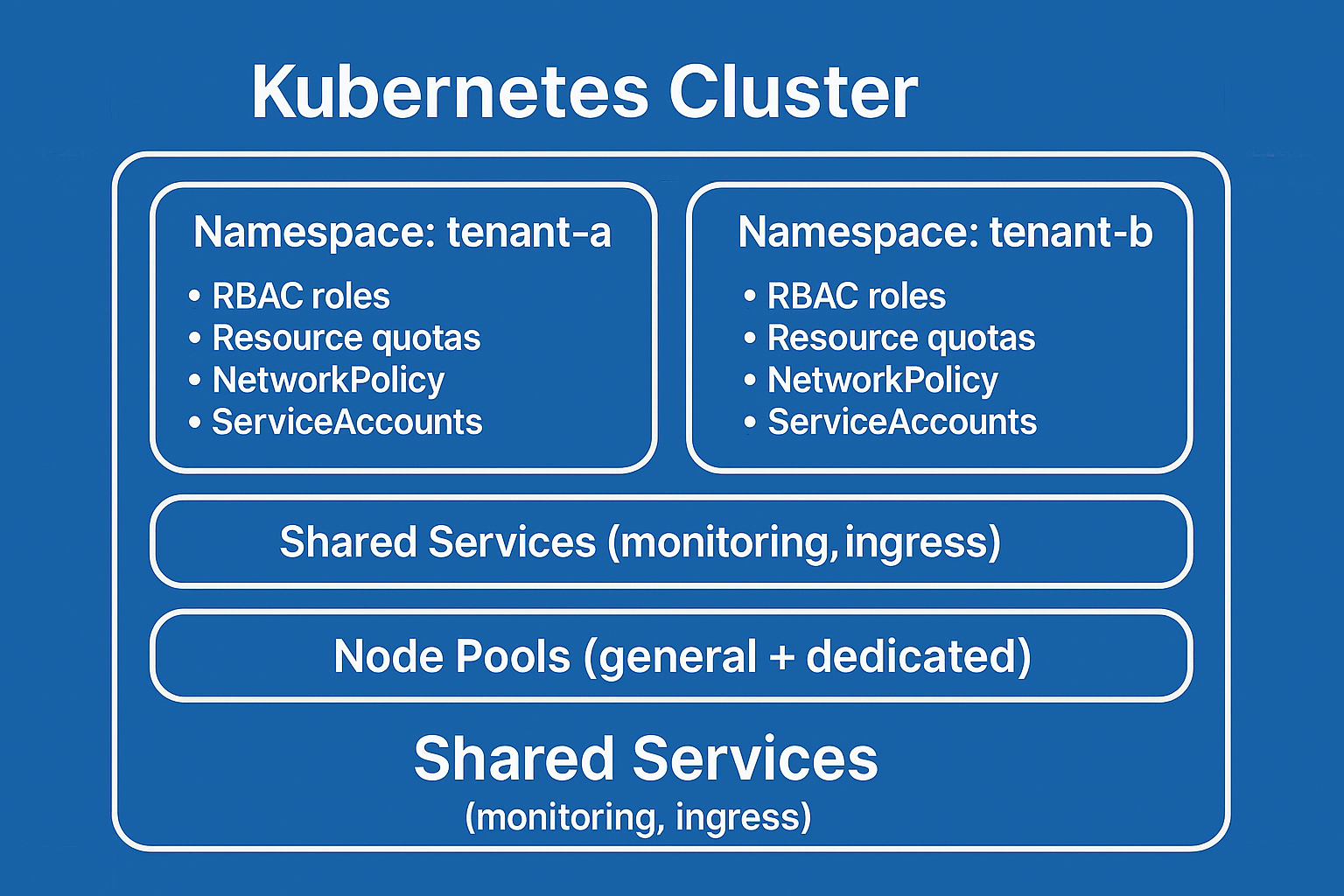
2. High-Level Architecture (Explained in English)
Here is the standard architecture layout used by large enterprises:
3. Step-by-Step Implementation Guide
Step 1 — Plan the Tenant Boundaries
Define what a “tenant" means in your system:
A team?
A customer?
A department?
A workspace/project?
Each tenant will get:
✔ A namespace
✔ Role groups
✔ Policies
✔ Quotas
✔ Network boundaries
✔ Secrets & key vault mapping
✔ GitOps repo folder
Example tenant name:
tenant-mapping: renesas-aiw-team-01
Step 2 — Create the Namespace Structure
Namespaces are the base isolation unit:
Do this for every tenant.
Automate namespace creation using:
Terraform
ArgoCD
GitOps templates
Cluster API
Step 3 — Apply Resource Quotas (CPU/Memory Limits)
Prevent noisy-neighbor problems:
This protects the cluster from abusive workloads.
Step 4 — Configure RBAC for Tenant Users
Create roles:
Bind them to users:
For enterprise usage, integrate:
Azure AD
AWS IAM
Okta
PingIdentity
Step 5 — Apply NetworkPolicies (MOST IMPORTANT)
Without network policies, tenants can talk to each other.
Lock down traffic:
This enforces namespace → namespace isolation.
Step 6 — Implement Gatekeeper/OPA for Governance
Enforce rules like:
Sample constraint:
OPA protects you from risky deployments.
Step 7 — Add Tenant-Specific Ingress Controls
Use:
Tenant-specific routing:
Step 8 — Implement GitOps for Each Tenant
Every tenant gets:
ArgoCD watches these paths and deploys only for that namespace.
Advantages:
✔ audit trail
✔ automated drift detection
✔ rollback with Git
✔ tenant self-service
Step 9 — Node Pool Strategy
Option 1 — Shared Node Pools (Soft multi-tenancy)
All workloads run together.
Option 2 — Dedicated Node Pools per Tenant (Hard multi-tenancy)
Critical workloads run in separate nodes.
Example:
Best for SDV platforms.
Step 10 — Add Observability Per Tenant
Setup:
App Insights
Prometheus
Grafana
Loki
Kusto dashboard
Create tenant dashboards:
Pod usage
CPU/mem pattern
Error rates
Deployments
Costs
This drives accountability & governance.
Step 11 — Add Cost Allocation & Billing (FinOps)
Use:
Kubecost
Azure Cost Allocation
AWS Cost Explorer
Label workloads:
You can now chargeback or showback costs per tenant.
4. Operational Workflows (End-to-End)
Let’s walk through an example workflow 👇
🚀 Developer Workflow: Tenant A Deploys a New App
Developer commits code
GitLab pipeline builds container image
Image pushed to ACR/ECR
GitOps repo updated with new manifest
ArgoCD detects change
ArgoCD syncs manifest to tenant-a namespace
Workload runs only on allowed nodes
NetworkPolicy prevents cross-tenant traffic
Metrics/logs stored under tenant-a dashboards
Cost allocation updated automatically
This workflow is 100% automated.
5. Real-World Use Cases (Where This Architecture Shines)
1. SDV Platforms
Teams running independent simulations.
2. Enterprise DevOps Platforms
Large engineering teams sharing a cluster.
3. Digital Twin Pipelines
Multiple algorithm teams deploying microservices.
4. Multi-Customer SaaS
Every customer as a tenant.
5. Automotive OTA & Validation Platforms
Vehicle model teams isolated from each other.
6. Best Practices Checklist (Industry Standard)
✔ Enforce resource limits
✔ Enable OPA/Gatekeeper
✔ Apply strict NetworkPolicies
✔ Use GitOps for deployment
✔ Set up cost allocation
✔ Rotate service account tokens
✔ Use workload identity (Azure/AWS)
✔ Use dedicated nodepools for sensitive workloads
✔ Use logging/telemetry isolation
✔ Automate tenancy provisioning
7. Conclusion
Multi-tenant Kubernetes is not just a design pattern — it is the foundation of modern cloud platforms.
When done correctly, it provides:
This architecture is the gold standard for enterprise DevOps, SDV platforms, and high-scale Kubernetes engineering.rnance.